Your customers order in under a minute.
A branded Quick Order Portal your customers actually use — on the phone in their pocket, the tablet on the bench, or a desktop. Their products, their prices, their delivery days. Orders land in Cin7 Core as sales, without anyone re-typing them.
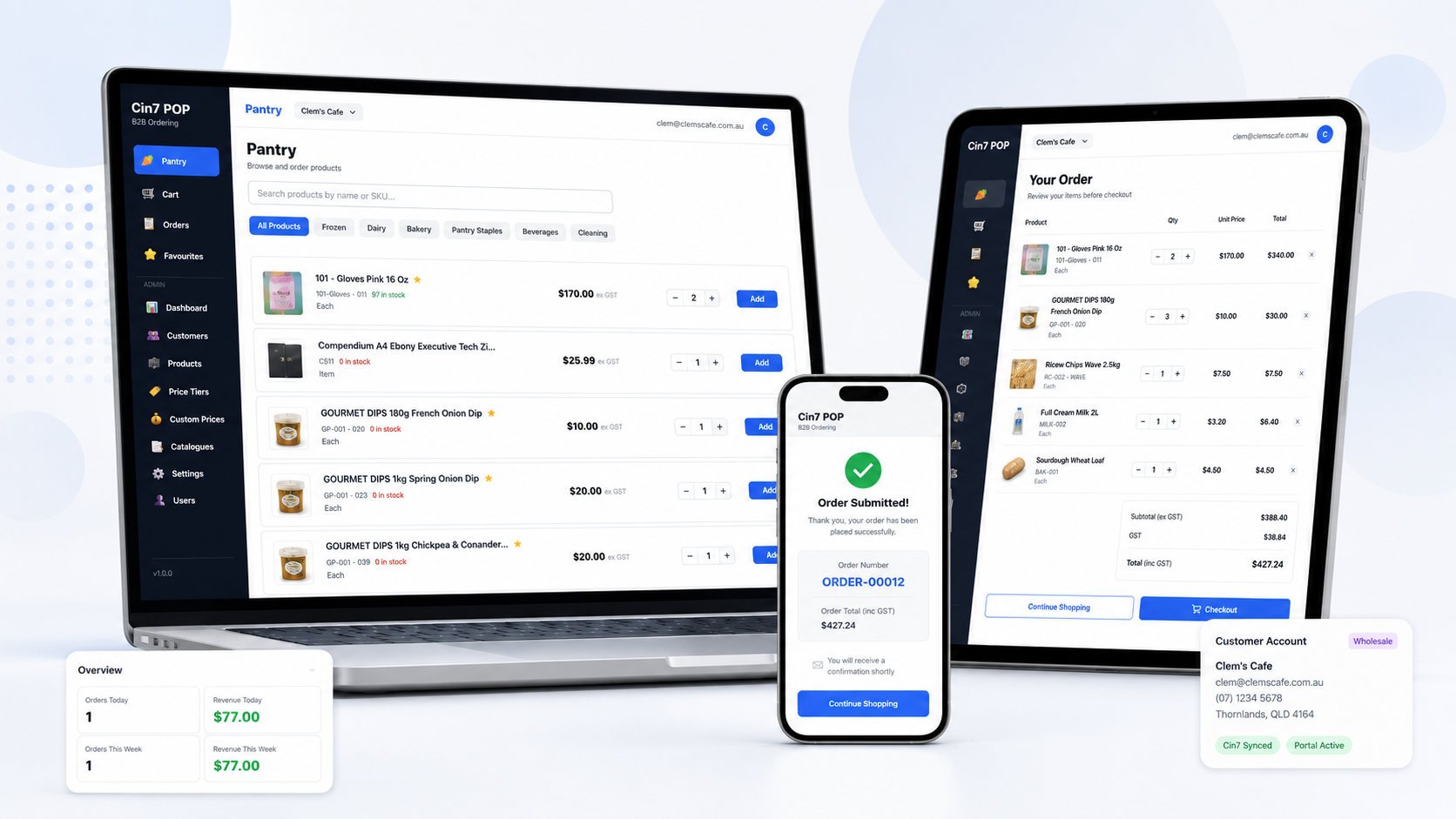
Wholesale ordering should not run on inboxes, PDFs and phone calls.
Cin7 POP gives your customers a simple way to order while your team keeps Cin7 Core as the single source of truth.
Every order creates avoidable admin.
- ✕Customers email, text or phone their orders through.
- ✕Someone re-keys every line into Cin7, and eventually gets one wrong.
- ✕Price lists go stale the moment they are exported to PDF.
- ✕Your office fields "where's my order?" calls all day.
- ✕Orders arrive after the truck has already been loaded.
Customers order themselves, correctly, the first time.
- ✓Buyers start from their last order and are done in under a minute.
- ✓Orders arrive in Cin7 Core as sales, already priced.
- ✓Products, prices and discounts come straight from Cin7.
- ✓Order status is visible without anyone picking up the phone.
- ✓Delivery dates respect your real runs and cut-off times.
Simple for your customers. Properly controlled for you.
The ordering screen is deliberately plain. Everything that makes wholesale complicated sits behind it, where your team decides how it works.
Cin7 Core
Inventory, fulfilment, invoicing and operational control stay exactly where they are today.
Cin7 POP
The ordering front end your customers actually see — quick reordering, their pricing, their delivery days, on your brand.
Real screens from the live product.
Not mock-ups. This is what your customers and your team will be looking at. Click any image to enlarge.
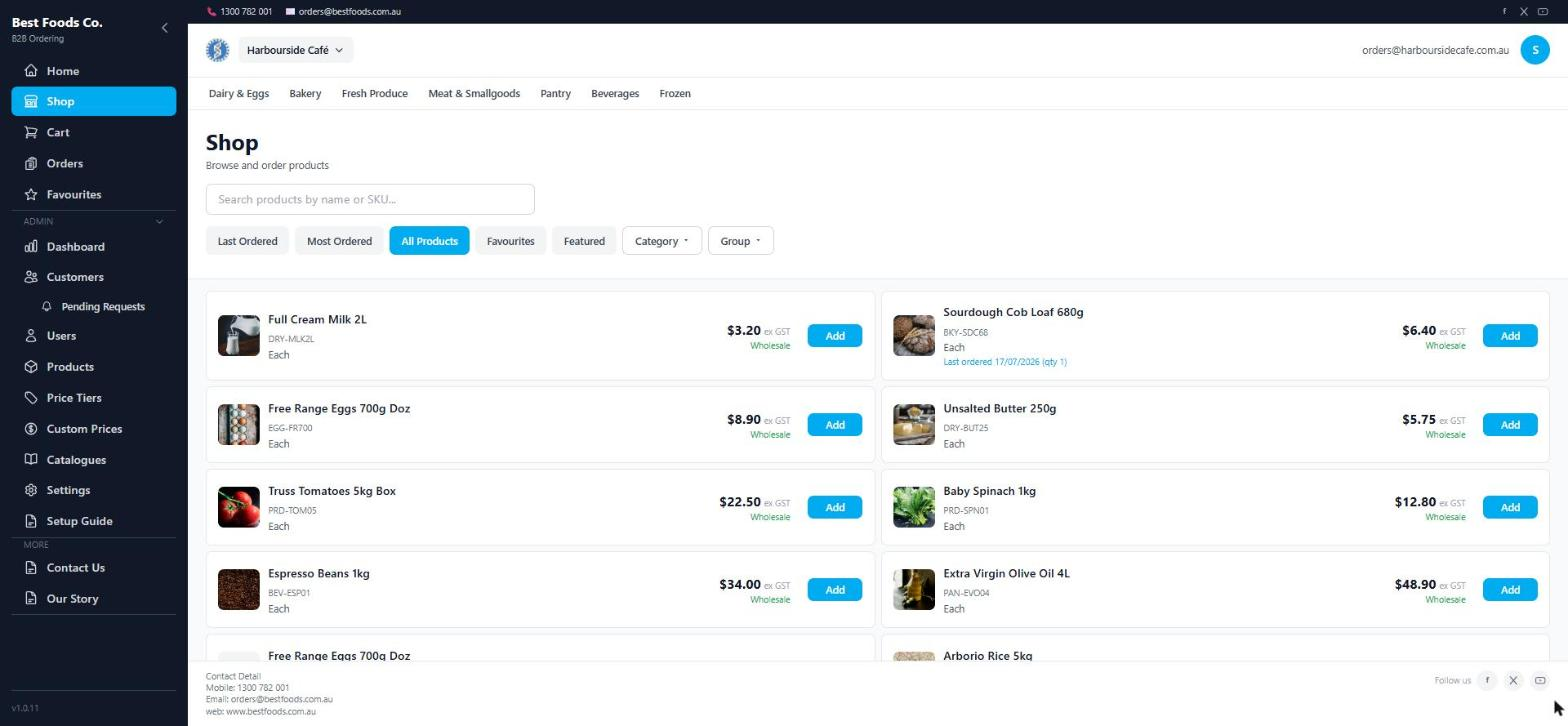
The ordering screen
Product images, the customer's own prices, a quantity box and Add. Last Ordered and Favourites are one tap away.
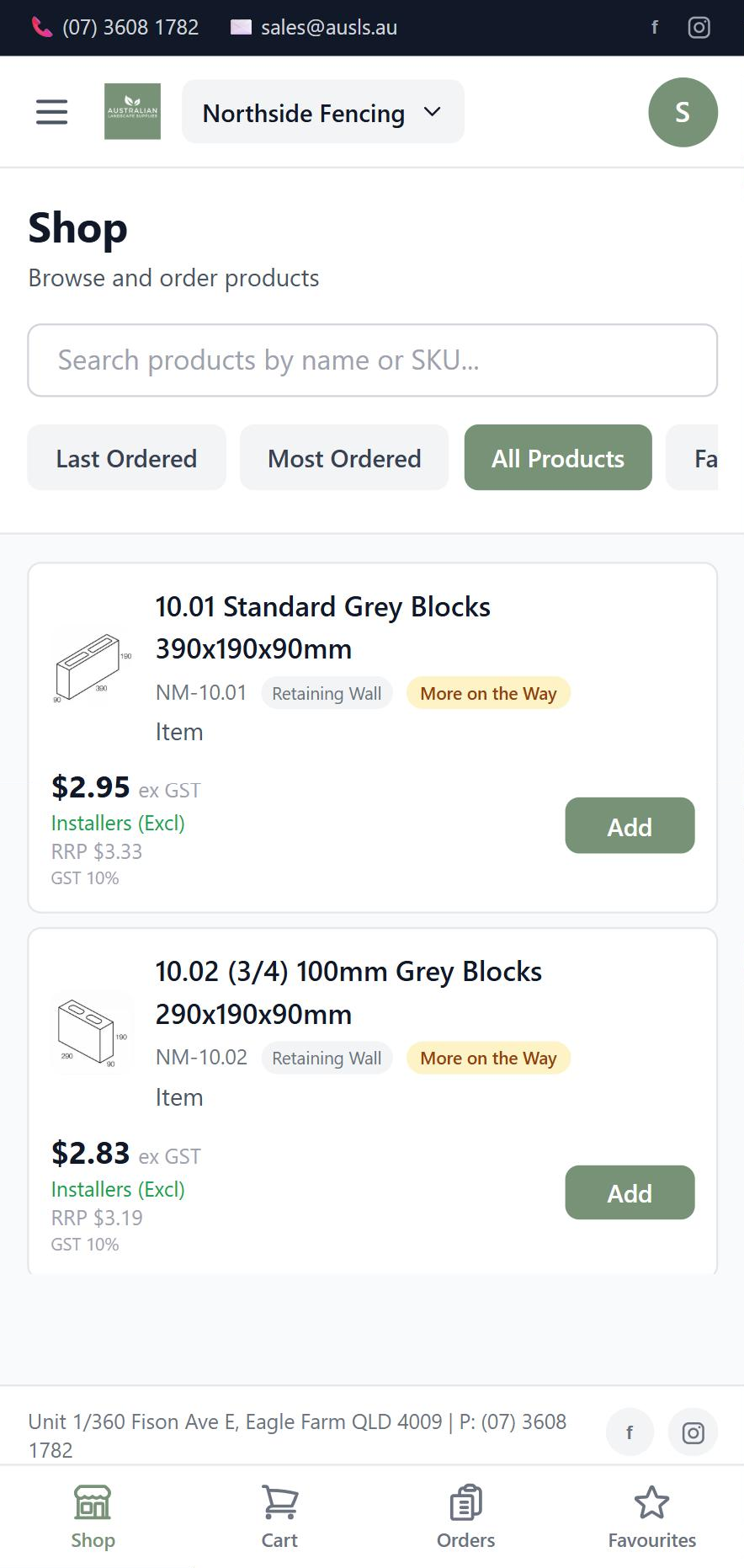
On a phone
Installed to the home screen like a native app — with your own stock wording, the customer's price tier and RRP alongside. A live customer portal, on a real phone.
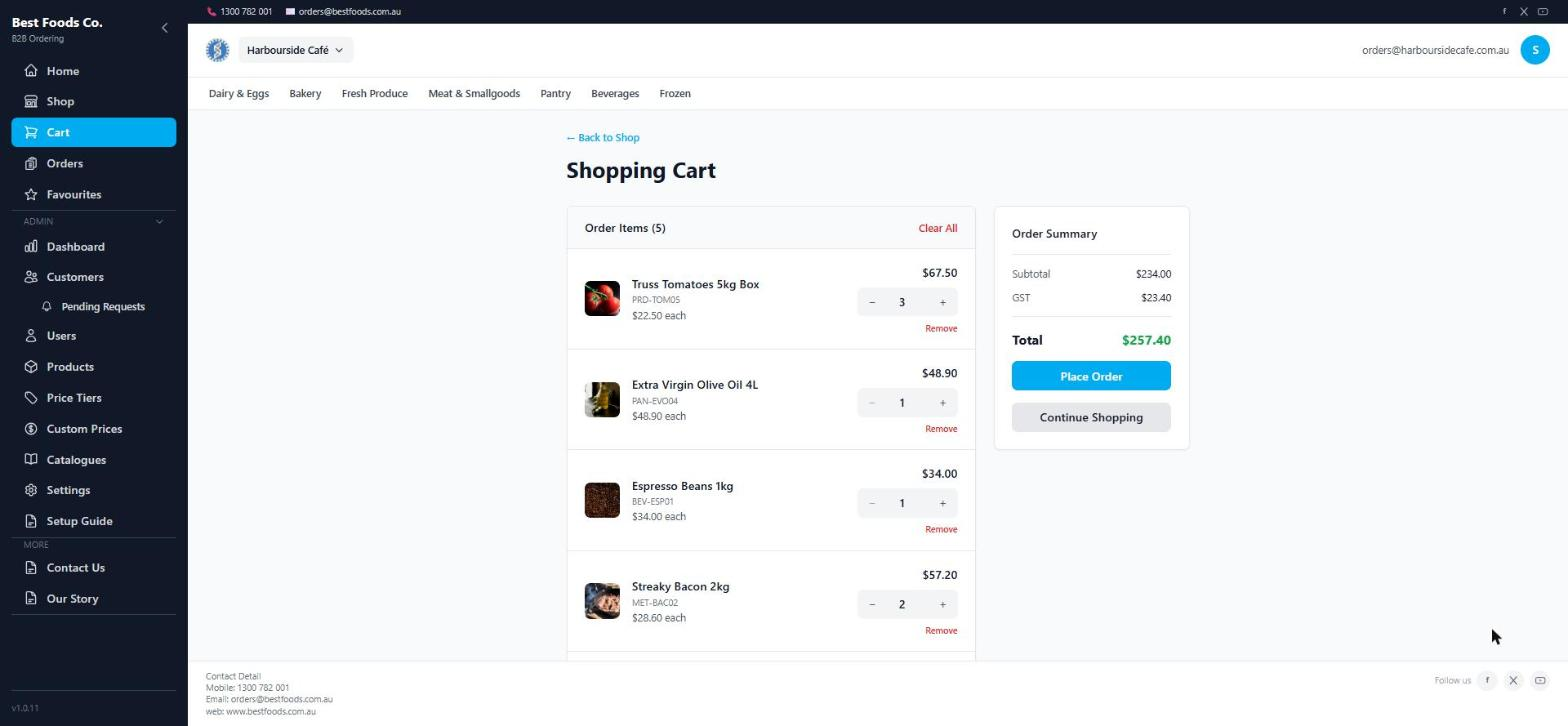
Cart & checkout
Line totals, GST from your Cin7 tax rules, and a delivery date drawn from the customer's run.
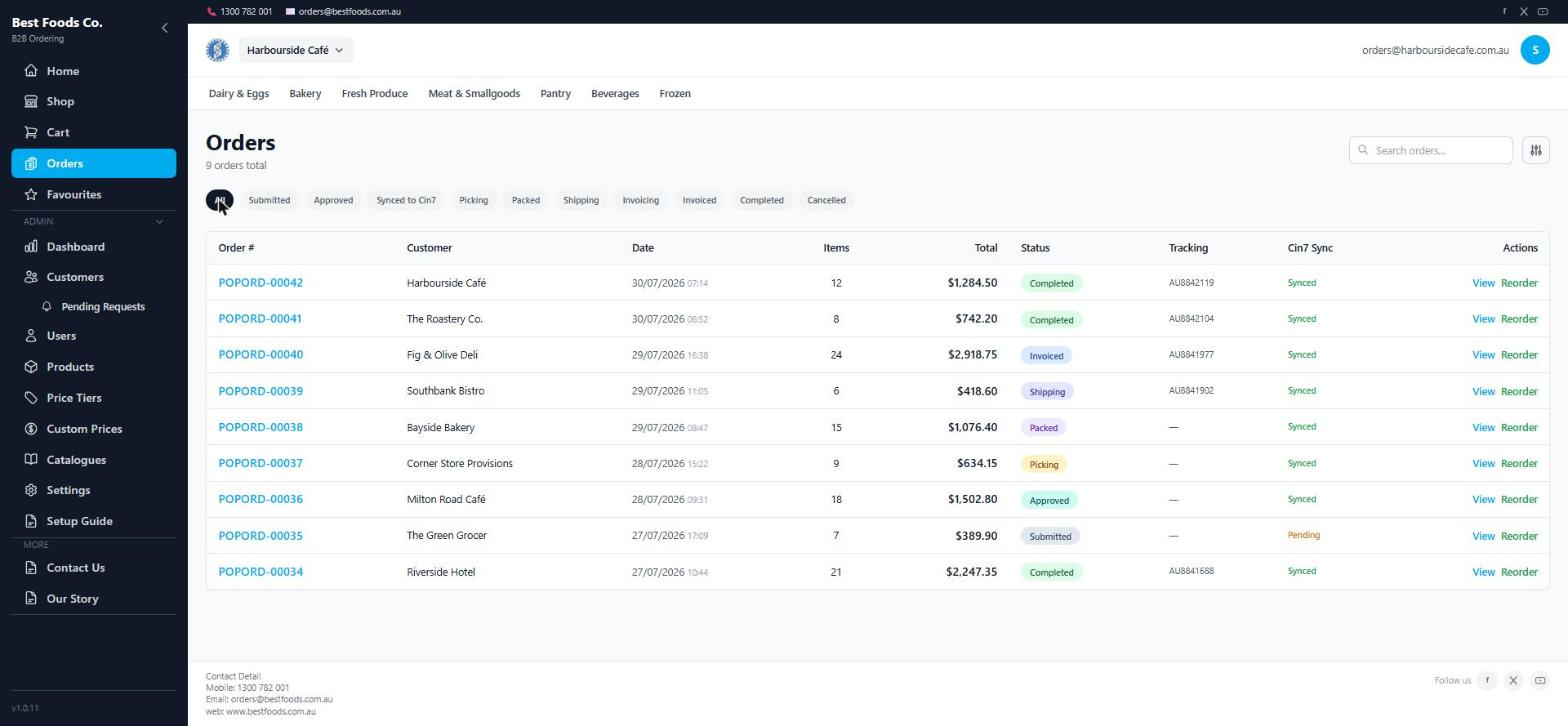
Order history
Every order, its status through picking and delivery, and confirmation it reached Cin7.
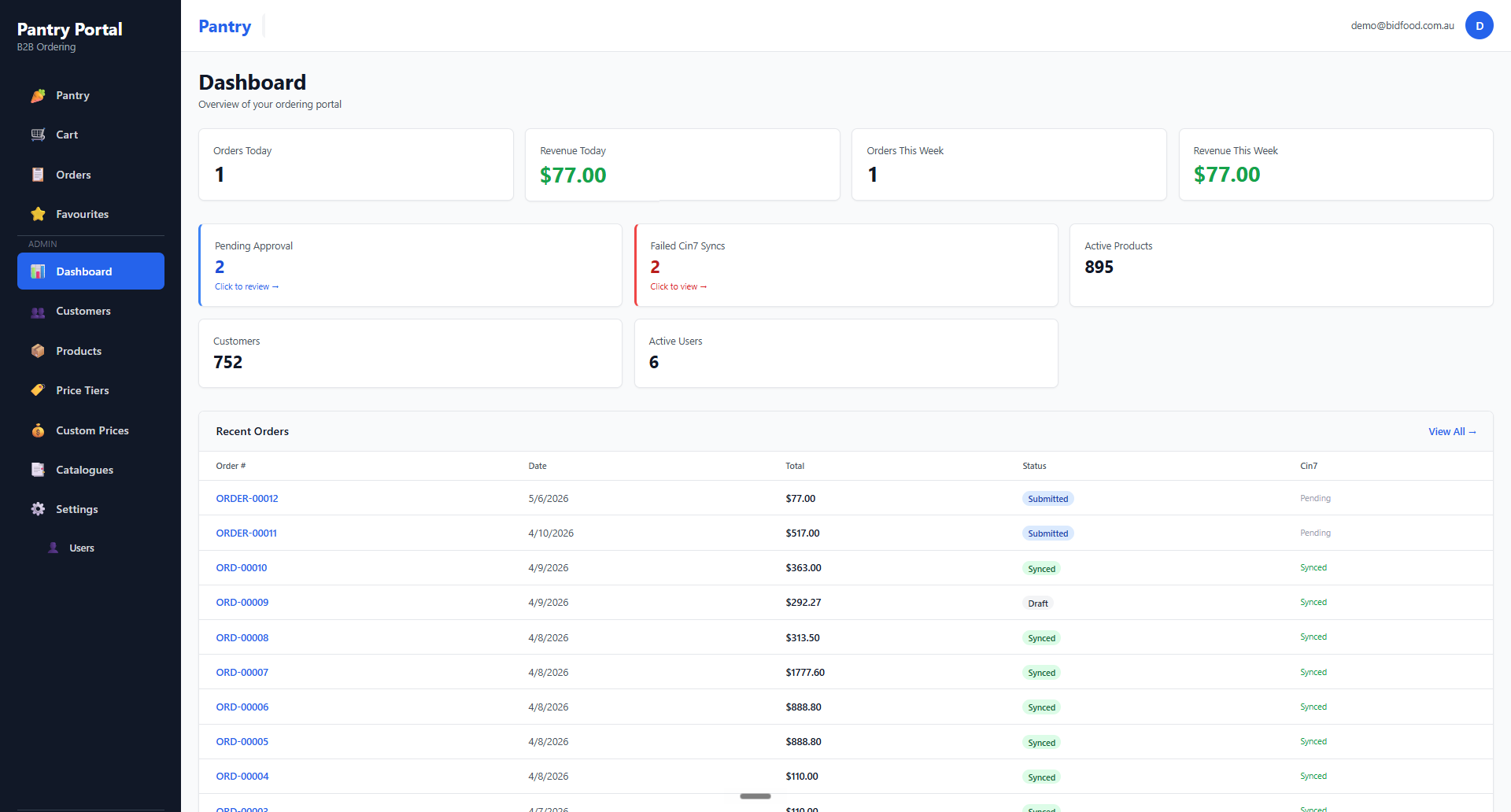
Admin dashboard
Orders and revenue today and this week, approvals waiting, and whether everything reached Cin7.
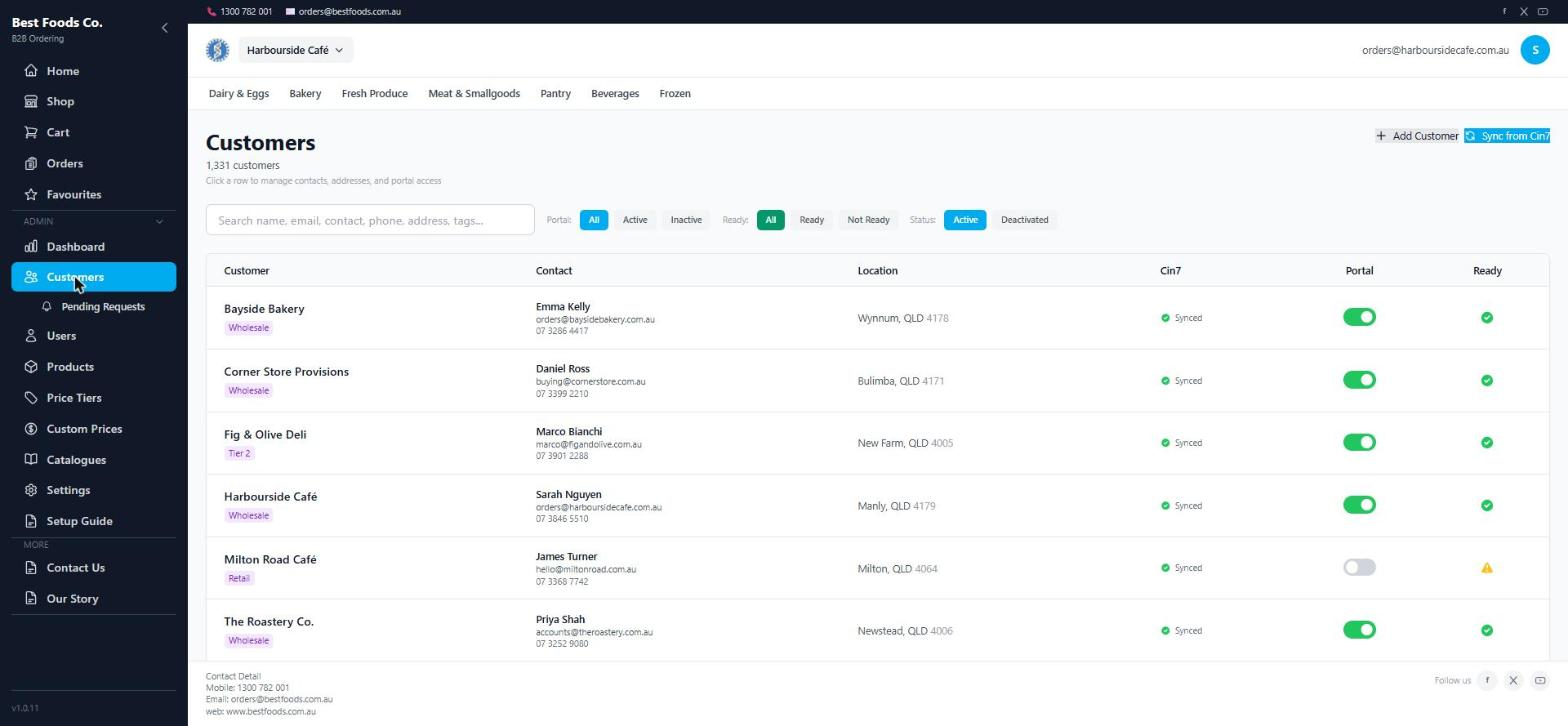
Customers
Portal access, price tier, contacts and delivery locations — with a readiness check before you activate anyone.
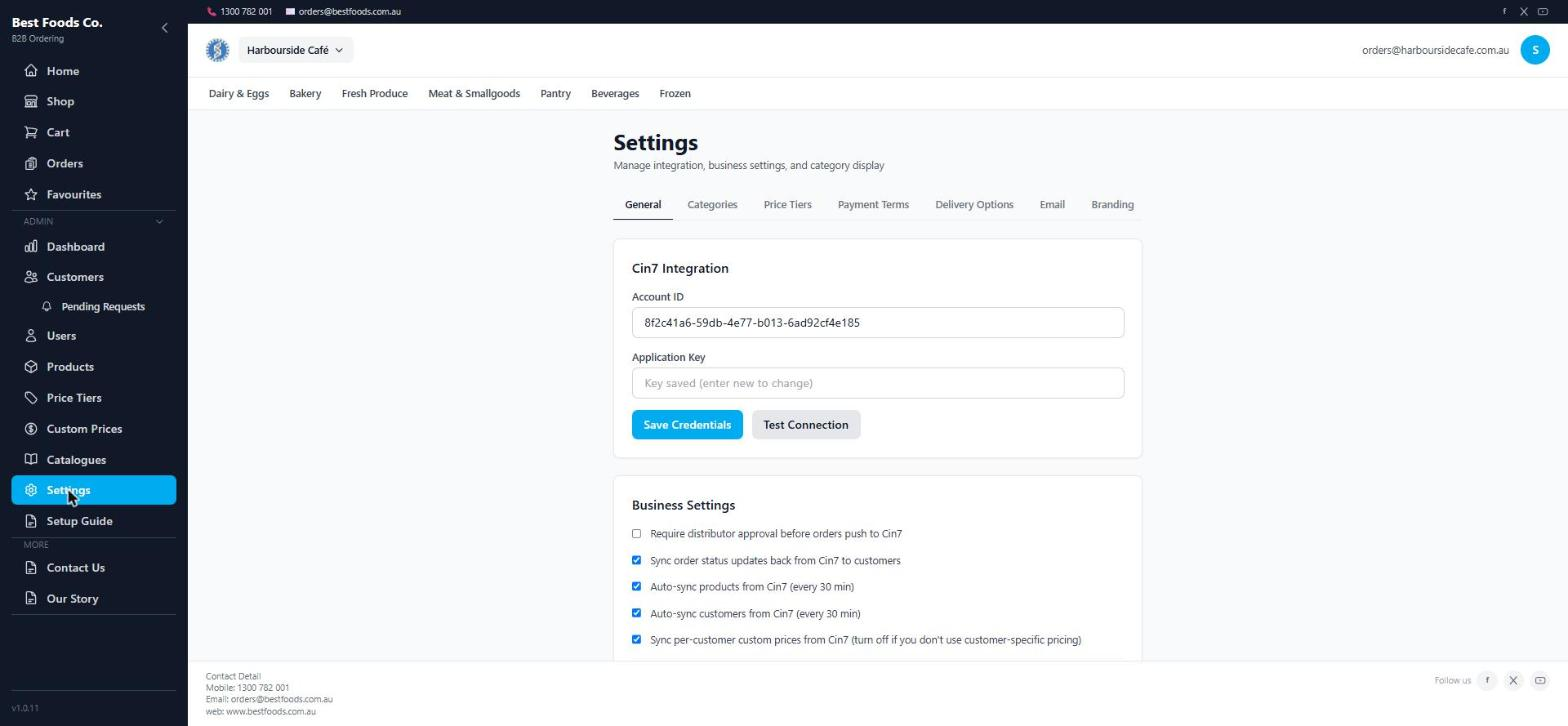
Cin7 Core connection
Paste your credentials, test the connection, and choose what syncs automatically. No black box.
It can be your website too.
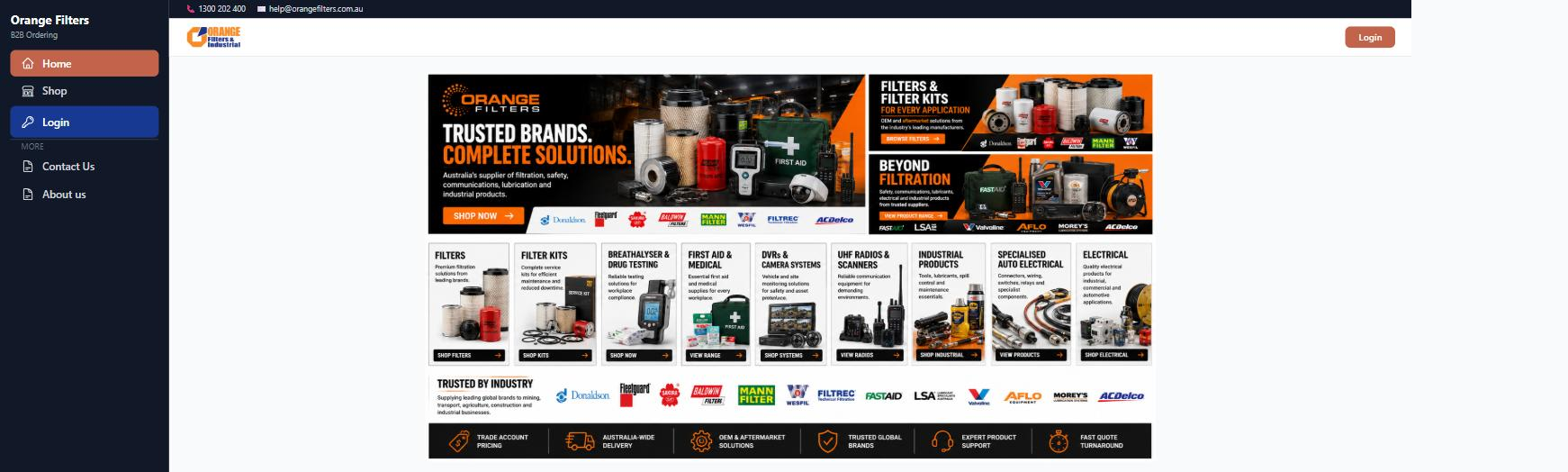
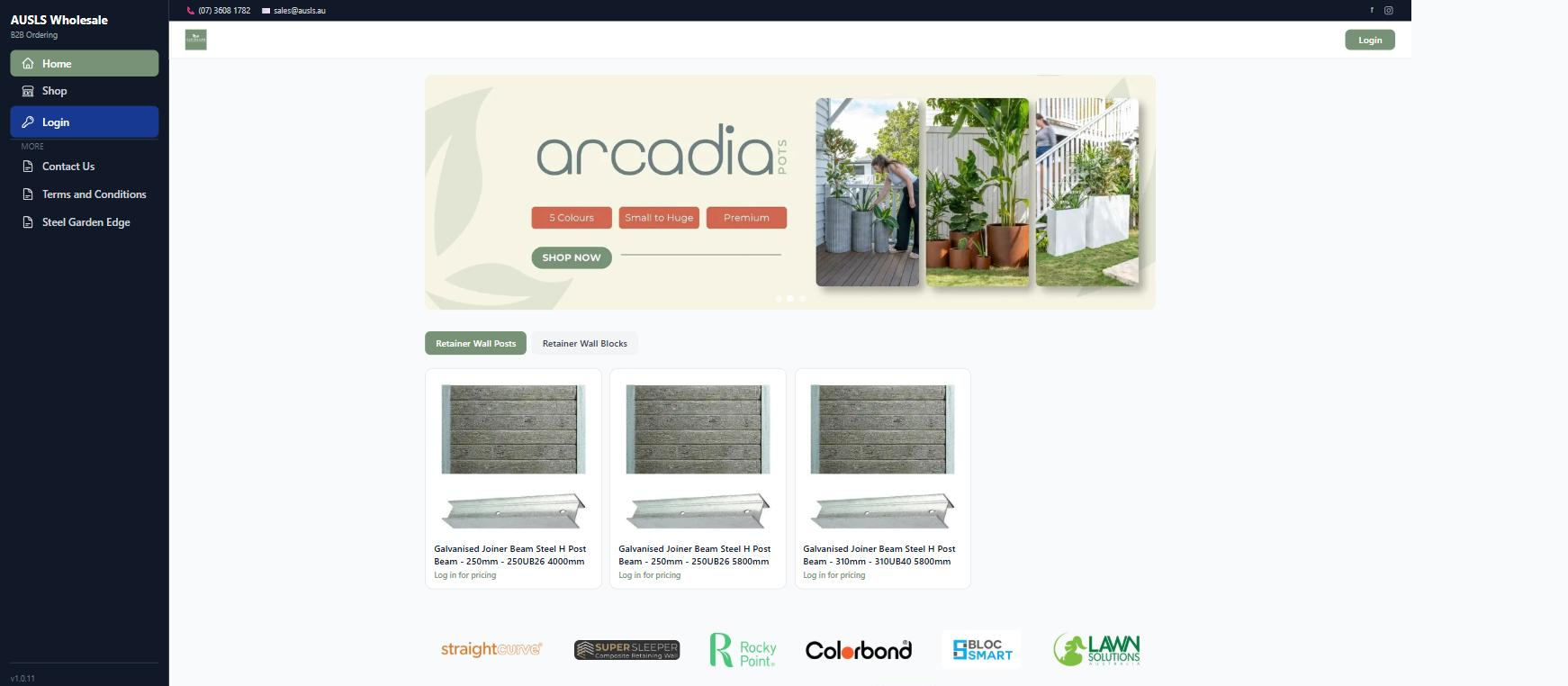
Plenty of distributors run a tired brochure site alongside a separate ordering system. Cin7 POP does both jobs from one place — and the two sites below are live customer portals, not mock-ups.
- ✓A home page you build yourself — carousel, banner tiles, featured products and your own selling points.
- ✓Content pages with a proper editor, so About, Delivery and Terms live here rather than with a web developer.
- ✓A navigation menu built from your Cin7 categories, tags or brands, or laid out by hand.
- ✓Visitors browse your catalogue without an account, with prices shown, hidden, or set to a public tier.
- ✓A request-an-account form that creates the customer for you, waiting on your approval.
- ✓Your own domain, your logo and colours, right down to the emails your customers receive.
From Cin7 connection to live customers in four steps.
There is an in-app setup guide that walks you through each of these, and we do it with you on the demo.
Plans that grow with your customer base.
Priced on how many of your customers use it, not on how much you sell. Every plan includes a 14-day free trial.
| Feature | Starter | Small | Medium | Enterprise |
|---|---|---|---|---|
| Monthly price | $48 | $99 | $199 | Custom |
| Client users | 1–15 | 16–99 | 100–199 | 200+ |
| Admin users | 1 | 1 | 1 | Unlimited |
| Sales reps | ✕ | 2 | 3 | Unlimited |
| Quick order & favourites | ✓ | ✓ | ✓ | ✓ |
| Cin7 Core sync | ✓ | ✓ | ✓ | ✓ |
| Catalogues | ✕ | ✓ | ✓ | ✓ |
| Custom pricing tiers | ✕ | ✓ | ✓ | ✓ |
| Delivery schedules | ✕ | ✓ | ✓ | ✓ |
| Order approval workflow | ✕ | ✓ | ✓ | ✓ |
| Email notifications | ✕ | ✓ | ✓ | ✓ |
| Priority support | ✕ | ✕ | ✓ | ✓ |
See it running against your own ordering process.
Tell us about your Cin7 Core setup, your customers and how they order today. We'll show you what changes.
Book a practical walkthrough
- Review how your customers order today and where the admin goes.
- See exactly what your customers would see.
- Walk through catalogues, pricing, delivery days, users and approvals.
- Talk through the Cin7 Core sync and what rollout actually involves.
Questions distributors ask first.
How does it integrate with Cin7 Core?
Products, images, customers, prices, discounts and tax rules sync from Cin7 Core into the portal. Orders placed by customers go back to Cin7 as sales orders, priced and discounted the way Cin7 expects. Payments taken in the portal are recorded against the sale.
Can each customer see different products?
Yes. Catalogues control exactly which products each customer sees, built by rule or by hand.
Can customers have different prices?
Yes. Price tiers, customer-specific prices and the discount percentage on the Cin7 customer record all come across and apply automatically.
Do my customers need training?
No. The ordering screen is deliberately plain — start from your last order, type quantities, choose a delivery date, done. It's a quick order pad, not an ERP. Distributors who've rolled it out generally send one email and that's the end of it.
Can I control delivery days?
Yes. Delivery days come from the customer's route or delivery option, with your cut-off and lead times applied, so checkout only offers dates you can actually deliver on.
Can I take payment?
Yes, through your own Stripe or PayPal account, with an optional surcharge. Customers you mark as prepay have their orders held until payment clears; everyone else can pay later or on account.
Can it run on my own domain?
Yes. Your domain, your logo and colours, across the portal, the login screen and the emails your customers receive.
Does it replace my website?
It can. There's a home page builder, editable content pages, a navigation menu built from your product categories, and public catalogue browsing for visitors without an account. Several distributors run it as their whole web presence.
What if my customers are out of signal?
The portal installs to a phone home screen like an app and keeps working offline for browsing, with the cart queued until the connection returns.
Is this the same as a pantry list ordering system?
Yes — pantry list ordering is where this started and it's still what most food distributors use it for. The product has simply grown beyond that into a full quick order portal.
How long does setup take?
Connecting Cin7 and syncing takes minutes. Setting up catalogues, pricing rules and delivery days is the real work, and there's an in-app setup guide for it. Most distributors are inviting their first customers within a week.
Can I upgrade later?
Yes. Start on the plan that matches your current customer count and move up as more of them come on board.
Ready to get your customers ordering themselves?
Start a 14-day free trial, or book a walkthrough and we'll set it up against your own Cin7 data.
“Cin7 POP was built by Cin7 Core implementers who spent years watching distributors re-key orders that customers could have placed themselves. It does that one job properly.”